You have not yet added any article to your bookmarks!
Join 10k+ people to get notified about new posts, news and tips.
Do not worry we don't spam!
Post by : Anis Farhan
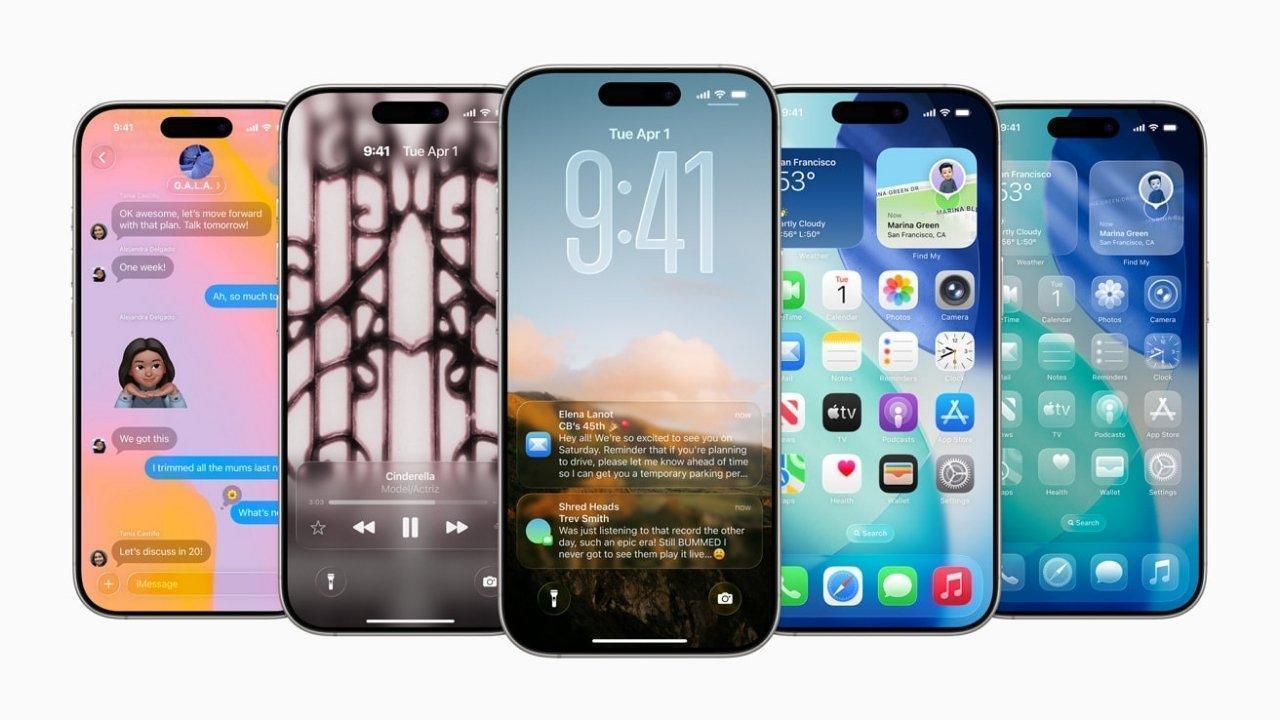
Apple’s iOS 26 introduces a design refresh dubbed Liquid Glass, inspired by visionOS. Menus, icons, and interface elements have a translucent, layered feel. You can now tint icons with new styles or even make them fully transparent. The lock screen is more adaptive: spatial photos can serve as dynamic backdrops, and clock fonts or positions adjust to better match what’s on screen. Visual flourishes are designed to feel fluid, polished, and more expressive.
These are the eight standout features picked by Indian Express for iOS 26—each adds something either beautiful, useful, or both.
Transparent / Tinted Icons & Refined Layout
You can now choose new tinting options for your Home Screen icons—including one that makes them fully see-through. Some icons have been rearranged. Visually, this means less distraction, more harmony with your wallpaper, and a cleaner look.
Unified & Smarter Phone / FaceTime Experience
The Phone app now joins recent and missed calls in a single view. There’s improved user control over unknown callers—call screening which asks the caller to identify themselves and hold-assist that notifies when an actual representative answers. FaceTime benefits from live translation when Apple Intelligence is enabled, making conversations easier across languages.
Streamlined Camera Interface
When you open the Camera app, things are simplified: only two main controls show up (photo / video). Other modes like portrait, panorama, etc. are accessed by swiping. Adjustments like exposure or aspect ratio are more fluid via swipe gestures. The mode-change and format options are easier to reach. Less clutter, more focus on what you’re capturing.
Improved Photos App Tabs
After previous redesigns, the Photos app gains subtler yet helpful tweaks. Tabs to switch between “Library” and “Collections” return, reducing scrolling and frustration. The interface is tuned to make it easier to find what you want—albums, events, curated groupings—without hunting endlessly.
Adaptive Lock Screen Enhancements
The lock screen now dynamically adapts to what’s happening with your wallpaper and clock interface. If your wallpaper has a subject placed low or high, the clock and other elements adjust so they aren’t blocked. Spatial photo effects give a sense of depth. Notifications and widgets integrate more smoothly with the visual design.
Apple Intelligence Features & Live Translations
Apple Intelligence (the AI‐powered part) stretches across system apps: Messages, Phone, FaceTime, etc. Real-time translation during calls and messages is now better integrated. The system can detect language needs more seamlessly. Those who communicate across languages should find this especially helpful.
Better Call Management / Hold Assist & Call Screening
Handling calls from unknown numbers gets smarter. The system can prompt callers to identify themselves. If you get placed on hold, Hold Assist watches for when a live representative answers so you don’t have to stay listening. For those sick of waiting on mute music or repeated hold, this is a real relief.
More Customisable Visual Experience
From custom backgrounds for chat threads to rearranged icons, tinting choices, and adaptive UI elements, iOS 26 gives more room to personalise. The balance between aesthetics and usability is being pushed: you control how transparent or dramatic the visual effects feel.
Putting beauty aside, these adjustments aren’t just skin-deep. They make a difference in daily usage, especially if you use your iPhone heavily. Here’s how:
Reduced Visual Clutter & Better Readability: Transparent or tinted icons tied with adaptive clock positioning reduce overlap and distraction. When you glance at your phone, what you see matters.
Smoother Task Flows: Fewer taps to get to modes in Camera, simpler UI in calls + FaceTime, better Photos layout—all these mean less time figuring out how to do something, more time actually doing it.
Language Barrier Lessened: Real-time translation in messages, calls, FaceTime helps people who juggle multiple languages. It makes communication easier and less awkward.
Personalisation Meets Efficiency: If your phone looks more yourself, you’ll enjoy using it more. If it feels intuitive, less annoyance. The new visual styles do that without sacrificing function.
Accessibility Gains: Refinements in layout, ability to customise visuals/tints help users who have trouble with visual strain or legibility.
With every big update, not everything lands perfectly. A few potential downsides or trade-offs deserve mention:
Visual Effects Can Be Overwhelming: Transparency, dynamic elements, fluid animation can look very pretty, but in bright light or over time may strain the eyes. Some users may prefer more solid, high-contrast settings.
Battery & Performance Considerations: New animations, transparencies, live translation etc. may increase resource usage. On older iPhones, this might mean slower response or more battery drain.
Learning Curve: Changes in layout, icon appearance, rearrangement can confuse users who are used to older versions. Especially for those less comfortable with changing settings.
Consistency Across Apps: System apps will likely adopt new aesthetics quickly, but third-party apps may lag. That can lead to jarring differences or older-style apps looking out of place.
Here are some suggestions to help you decide:
If you value aesthetics and enjoy tweaking appearance, this is a great update. New visual styles, transparent icons, adaptive lock screen—all make the phone feel fresh.
If you frequently use calls with people in other languages, or need translation tools often, Apple Intelligence improvements will help.
If you have an older device or rely heavily on battery, you might want to wait a short while, see user reviews about performance and battery impact before jumping in.
For users sensitive to visual strain or those who mainly use their phone for basic tasks, it might be worth exploring settings to reduce transparency or tone down visual effects.
To make the most of these new features, here are some practical tips:
After updating, spend some time in settings tweaking icon transparency or tint until the visuals feel comfortable.
Explore Apple Intelligence settings: set up live translation languages you frequently use, test FaceTime translations.
Try adjusting wallpaper and lock screen with spatial photos so your lock screen feels more dynamic.
Use the Camera’s simplified UI and gestures—practice swiping to find settings rather than hunting for them.
If call screen or hold assist features are enabled, test them out. They may reduce frustration a lot.
For those bothered by visual effects, experiment with display settings—higher contrast, reduced transparency—to balance aesthetics with comfort.
iOS 26 isn’t just about looking pretty—though it definitely brings fresh, polished visuals. It’s also about streamlining daily use: more intuitive calls & FaceTime, smarter translation, cleaner camera experience, customisation that actually means something.
If you update to iOS 26, you’ll probably notice your phone feels newer—more yours. Things may take a moment to get used to, especially visually, but overall this version balances efficiency and style more than many past updates.
This article is based on currently available information about iOS 26. Some features may vary by model, region, or get refined in later minor updates. Always keep device backed up before major OS updates.







George Russell Wins Dutch GP Sprint, Boosts Mercedes Morale
George Russell wins the Dutch GP Sprint from pole as Mercedes teammate Kimi Antonelli extends his F1

Australia 50/3 After Bangladesh Bowled Out for 64 in Second Test
Australia reached 50/3 after Bangladesh were bowled out for 64 in the second Test, with Mitchell Sta

Jordan Burroughs Returns to Wrestling with 2028 Olympic Dream
Jordan Burroughs returns to wrestling with Real American Freestyle as the Olympic champion eyes a po

Lamborghini Catches Fire on Singapore's ECP, Causing Heavy Traffic
A Lamborghini caught fire on Singapore's ECP, causing heavy traffic and bus delays. No injuries were

Bangkok Airport Duty-Free Area Flooded by Pipe Burst
A burst water pipe flooded the duty-free shopping area at Bangkok's Suvarnabhumi Airport on July 16,

Nine Monks Killed in Thailand Pickup Truck Tragedy
An 11-year-old boy driving a pickup truck crashed into monks during a pilgrimage in northeastern Tha